FE retake rules · Checked September 26, 2026
How many times can you take the FE exam?
NCEES allows one attempt per testing window and no more than three attempts in any 12-month period. Your licensing board may impose a stricter limit. The NCEES rule is not a lifetime limit of three attempts.
Both limits apply together. A new calendar year does not erase attempts still inside the preceding 12 months. Check your previous dates and the board selected in MyNCEES before paying for another registration. The NCEES Examination Administration Policy, EAP 1.D and 1.F also says that someone who has passed may not retake the same exam unless a member board requires it.
When can you retake the FE exam?
| Previous attempt window | Next possible window |
|---|---|
| January–March | April–June |
| April–June | July–September |
| July–September | October–December |
| October–December | January–March of the following year |
The table shows the earliest next window only. You still need room under the rolling three-attempt limit, any required board approval, and an available appointment. The policy uses calendar quarters; it does not establish a universal 90-day wait after every attempt.
For example, a September attempt and an October attempt fall in different windows. A July attempt and a September attempt fall in the same window. That distinction matters more than counting three months from the date on your result.
What happens after three failed attempts?
Write down all three exam dates. A fourth attempt must satisfy both the window rule and the rolling 12-month rule, so simply moving into the next quarter may not be enough. If MyNCEES requires board approval, use the board's repeat-exam process before booking. The NCEES licensing board directory is the starting point for the jurisdiction-specific rule.
How much does an FE retake cost?
The current NCEES FE registration fee is USD 225. A failed attempt requires another registration payment; it is not a free retry. Board or international administration charges may add to that amount. NCEES FE registration and fees.
Retaking after an exam and rescheduling an appointment you have not taken are different transactions. If you still have an upcoming booking, read its cancellation or rescheduling terms before creating another registration.
Test readiness before paying for another FE attempt
Start with the free worked problems and sample PDF for your discipline. If the repaired areas hold on unseen inputs, use one fresh Form A as a 110-question rehearsal. Each form on sale below is a separately sold USD 29 printable PDF with complete worked solutions and a knowledge-area score sheet. These are independent practice materials, not official NCEES questions, a score conversion, or a pass guarantee.
FE Civil
14 free worked knowledge-area problems and a no-account sample PDF. Form A contains 110 original problems, complete solutions, and an area score sheet.
FE Mechanical
14 free worked knowledge-area problems and a no-account sample PDF. Form A contains 110 original problems, complete solutions, and an area score sheet.
FE Electrical and Computer
17 free worked knowledge-area problems and a no-account sample PDF. Form A contains 110 original problems, complete solutions, and an area score sheet.
FE Environmental
15 free worked knowledge-area problems and a no-account sample PDF. Form A contains 110 original problems, complete solutions, and an area score sheet.
FE Other Disciplines
14 free worked knowledge-area problems and a no-account sample PDF. Form A contains 110 original problems, complete solutions, and an area score sheet.
FE Chemical
17 free worked knowledge-area problems and a no-account sample PDF. Form A contains 110 original problems, complete solutions, and an area score sheet.
FE Industrial and Systems
13 free worked knowledge-area problems and a no-account sample PDF. Form A contains 110 original problems, complete solutions, and an area score sheet.
How to prepare after a failed FE attempt
Results usually appear in MyNCEES within 7–10 days. A failed result includes an area diagnostic. Start with that report before buying another course or committing to an early retake. NCEES scores first-time and repeat candidates to the same standard; failing once does not cause a harder passing requirement. NCEES scoring and results.
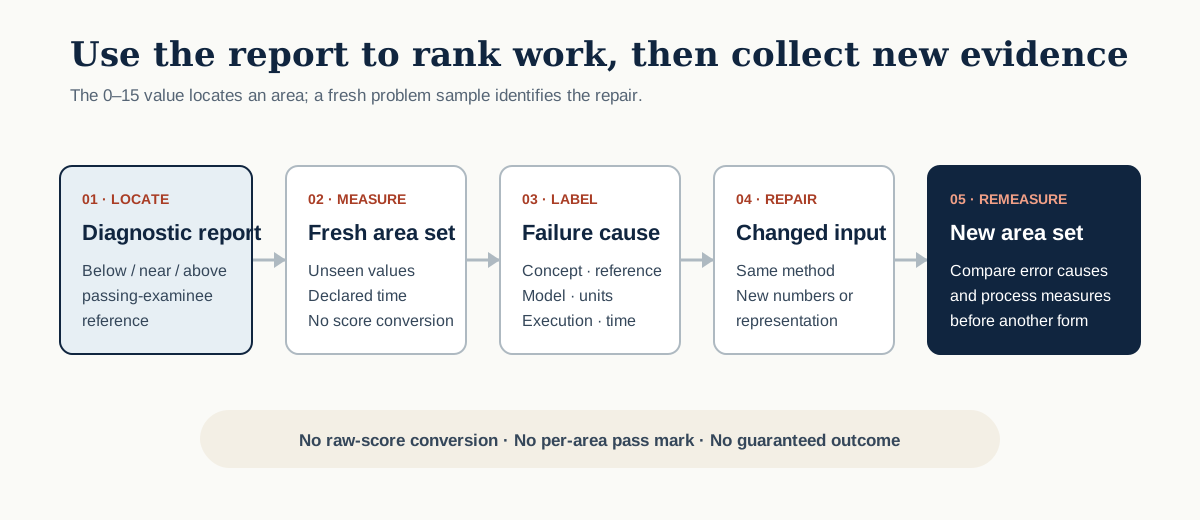
The diagnostic's 0–15 values cannot be converted into raw percentages. Read our FE passing score explanation if you are trying to work out how close you were. For study planning, identify the areas below the passing-candidate reference and check whether the difficulty is missing knowledge, handbook retrieval, or execution under time pressure.
Read three fields, not one bar
The current NCEES sample diagnostic report shows the knowledge area, number of items, a 0–15 performance value, and a visual comparison with the average performance of passing examinees. The guide says the scale exists to make diagnostic reports comparable across computer-based exams and across a candidate's attempts. It also states that the number of questions answered correctly cannot be determined from that scale.
Start with the relative position against the passing-examinee reference. Then use the published question range only as exposure context. Neither field tells you whether today's problem is concepts, handbook search, modelling, units, execution, or time.
Build a diagnostic-to-priority table
The rows below are fictional. Replace them with your areas and evidence from a new set of problems; do not enter candidate-identifying data in a shared document.
| Area | Report position | Question range | Fresh failure | Priority |
|---|---|---|---|---|
| Area A | Clearly below the passing-examinee reference | 10–15 | Equation selection | First |
| Area B | Near the reference | 8–12 | Units | Second |
| Area C | Above the reference | 4–6 | None in the sample | Maintenance |
Run four stages
- Measure. Solve a small unseen set in every below or near area. Record whether each miss came from concept, reference search, model, units, execution, or time.
- Repair. Practice the cause rather than the label. A handbook-search miss needs locator retrieval; a unit miss needs an explicit dimensional check.
- Transfer. Change the numbers, representation, or boundary condition so the previous answer cannot be recalled.
- Remeasure. Use a new knowledge-area set. Take another full form only after the cause-specific repair survives changed input.
A four-week evidence board
| Week | Work | Exit evidence |
|---|---|---|
| 1 | Fresh samples in below and near areas | Every miss has one earliest cause |
| 2 | Cause-specific drills and blank-paper reconstruction | The method works without the old solution |
| 3 | Changed-input area sets | Dominant error counts fall on unseen values |
| 4 | New full form under a written timing plan | Comparable area scorecard and next decision |
Repeat pass rates and retake plans by discipline
Repeat examinees pass at roughly half the first-time rate in every published discipline. The figures are NCEES fiscal year 2025 attempts (October 2024–September 2025) from NCEES Squared 2025, checked September 26, 2026. They describe candidate groups, not your own chance of passing.
| FE discipline | First-time pass rate | Repeat pass rate | Repeat attempts |
|---|---|---|---|
| FE Civil | 61% of 16,639 | 32% | 9,863 |
| FE Mechanical | 69% of 11,552 | 37% | 2,120 |
| FE Electrical and Computer | 64% of 5,882 | 31% | 2,020 |
| FE Environmental | 67% of 2,543 | 37% | 1,092 |
| FE Other Disciplines | 61% of 2,386 | 29% | 951 |
Retaking the FE Civil exam: rebuild the civil clusters that carry the form
The four heaviest FE Civil knowledge areas — Structural Engineering (10-15), Geotechnical Engineering (10-15), Water Resources and Environmental Engineering (10-15) and Mathematics and Statistics (8-12) — account for about 44 of the 110 questions on the EngineerProof form.
Read structural, geotechnical, and water resources as three separate signals. If all three sit below the passing-examinee line, start with statics, mechanics of materials, and fluid mechanics before returning to design-style questions. If only one cluster is weak, keep the other two in short maintenance sets and put the longer sessions into the weak cluster.
- Redo missed structural and geotechnical problems without notes, writing the free-body diagram or soil profile before opening the handbook.
- Run a separate water-resources block that mixes pipe flow, open-channel flow, and environmental calculations so equation selection is tested, not memorized by chapter.
- Finish with a mixed civil block that includes transportation, surveying, and construction; these areas reveal whether the repaired fundamentals transfer outside the original chapter.
Before booking: Use the score sheet to compare structural, geotechnical, and water-resources accuracy separately. A higher total can hide an unchanged weak cluster, so require improvement in the specific cluster that triggered the retake.
Free FE Civil problems by knowledge area · Form A and Form B previews
Retaking the FE Mechanical exam: separate modeling errors from handbook errors
The four heaviest FE Mechanical knowledge areas — Thermodynamics (10-15), Mechanical Design and Analysis (10-15), Statics (9-14) and Dynamics, Kinematics, and Vibrations (10-15) — account for about 42 of the 110 questions on the EngineerProof form.
Mechanical misses often look alike after the fact: an incorrect system boundary, the wrong sign convention, or the right equation with the wrong state. Sort dynamics, fluid mechanics, thermodynamics, and design misses by that cause before choosing another problem set. Chapter totals alone do not show which habit needs repair.
- For dynamics and mechanics of materials, sketch the body, coordinates, and loads before calculating; mark any force or moment that was inferred rather than given.
- For fluids, thermodynamics, and heat transfer, state the control volume and assumptions, then locate the handbook relationship before substituting values.
- Combine those areas with mechanical design in a timed block and record whether each miss came from the model, handbook lookup, units, algebra, or time pressure.
Before booking: A retake form should show fewer repeated error types, not merely different missed questions. If unit or system-boundary errors persist across two high-weight areas, repair that pattern before scheduling.
Free FE Mechanical problems by knowledge area · Form A and Form B previews
Retaking the FE Electrical and Computer exam: anchor the retake in mathematics and circuit analysis
The four heaviest FE Electrical and Computer knowledge areas — Mathematics (11-17), Circuit Analysis (DC and AC Steady State) (11-17), Digital Systems (8-12) and Electronics (7-11) — account for about 41 of the 110 questions on the EngineerProof form.
Mathematics and circuit analysis account for 24 problems on this form, while electronics, power systems, controls, and digital systems form the next large block. First decide whether the diagnostic report points to a foundation problem or to one applied system; the study order should be different.
- Work short circuit sets that require a fresh schematic, reference direction, and phasor or time-domain choice before any calculator entry.
- Pair each weak applied area with its prerequisite: electronics with circuit models, controls with linear systems, and communications with signal processing.
- Use a mixed digital, power, and electronics block to test rapid context changes, then tag every miss as concept, convention, handbook lookup, or computation.
Before booking: Do not let a strong software or networks section offset unchanged circuit-analysis performance in the total score. Compare the 12-question mathematics and 12-question circuit rows independently before booking.
Free FE Electrical and Computer problems by knowledge area · Form A and Form B previews
Retaking the FE Environmental exam: treat the water sequence as one connected system
The four heaviest FE Environmental knowledge areas — Water and Wastewater (12-18), Fluid Mechanics and Hydraulics (12-18), Surface Water Resources and Hydrology (9-14) and Groundwater, Soils, and Sediments (8-12) — account for about 46 of the 110 questions on the EngineerProof form.
Fluid mechanics and hydraulics, hydrology, groundwater, and water and wastewater account for 46 problems on this form. Map misses across that sequence: a weak hydraulics foundation can surface later as a hydrology or treatment error even when the chapter labels differ.
- Begin with conservation, units, and hydraulic relationships, then redo the missed fluid-mechanics problems without relying on the original solution path.
- Move through hydrology and groundwater before water and wastewater so flow, storage, and transport assumptions remain visible from one set to the next.
- Add air quality, solid waste, chemistry, and risk questions to a final mixed block; the retake still tests the whole environmental specification.
Before booking: Score the four water-related rows separately as well as together. Improvement should appear upstream in hydraulics and downstream in the application areas, rather than coming only from a familiar treatment problem set.
Free FE Environmental problems by knowledge area · Form A and Form B previews
Retaking the FE Other Disciplines exam: build a mechanics spine without neglecting the breadth
The four heaviest FE Other Disciplines knowledge areas — Fluid Mechanics (12-18), Statics (9-14), Dynamics (9-14) and Strength of Materials (9-14) — account for about 42 of the 110 questions on the EngineerProof form.
Statics, dynamics, strength of materials, fluid mechanics, and thermodynamics and heat transfer account for 51 problems on this form. That makes mechanics the main study spine, but the remaining 59 questions still span mathematics, chemistry, safety, economics, controls, materials, and electrical fundamentals.
- Link statics to strength of materials in the same session so loads, reactions, stress, and deformation are followed through rather than practiced as isolated chapters.
- Pair fluids with thermodynamics and heat transfer, recording the system boundary and units before choosing a handbook equation.
- Reserve a recurring breadth block for chemistry, safety, controls, economics, and electrical fundamentals; rotate the weakest two areas into every session.
Before booking: Require progress in both the 51-question mechanics group and the rotating breadth group. A mechanics-heavy practice score can otherwise conceal the same cross-discipline weakness reported on the first attempt.
Free FE Other Disciplines problems by knowledge area · Form A and Form B previews
Choose the next full form on evidence
EngineerProof's independent practice forms contain 110 original four-choice questions and a knowledge-area score sheet. They do not reveal official questions, reproduce alternative item types, or convert a practice result into an NCEES result. Use the test–repair–retest gate before opening a second full form. FE Civil candidates can record the first sitting with the 14-area scorecard workflow.
Sources and corrections
NCEES is the authority for exam administration, scoring, and the diagnostic report. The study plan on this page is EngineerProof editorial guidance. Report a suspected error through the contact information on the EngineerProof about page.